

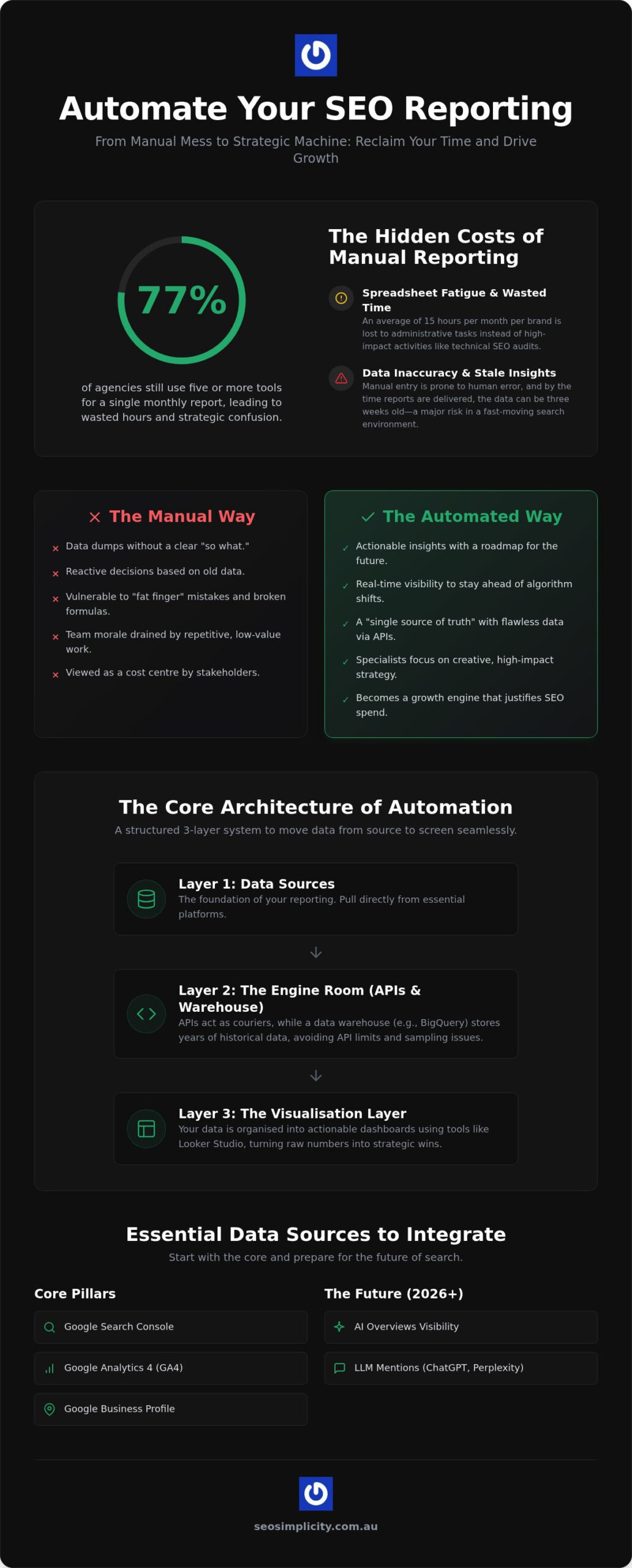
Did you know that 77% of agencies still pull data from five or more different tools just to prepare for a single monthly meeting? It is a staggering amount of manual labour that often leads to messy spreadsheets rather than strategic clarity. When you choose to automate seo reporting, you stop wasting hours copying figures from Google Search Console into Excel and start focusing on the growth that actually matters. We understand the frustration of building reports that look decent but fail to tell your stakeholders what to do next.
In this guide, we will show you how we used Viktor.com to transform our monthly workflow from start to finish. You will learn how to reclaim your time and improve your search strategy by building a robust, automated system that delivers actionable insights. We are going to walk you through the entire setup so you can finally move away from manual data entry and start delivering the technical clarity your brand deserves. By the end of this article, you will have a clear path to a set and forget reporting system that justifies your SEO spend with ease.
Key Takeaways
- Identify the hidden productivity drains caused by manual data entry and learn how to eliminate “spreadsheet fatigue” for good.
- Understand the technical architecture required to automate seo reporting effectively using APIs, connectors, and modern data warehouses.
- Compare the latest enterprise-grade platforms and AI-first reporting agents to find the right fit for your brand’s specific needs.
- Follow a structured setup guide to audit your essential KPIs and establish reliable data permissions for a robust dashboard.
- Shift your focus from data collection to high-level strategy by adding expert commentary that turns automated charts into actionable business insights.
Why Manual SEO Reporting is Costing Your Business Time and Growth
Many Australian marketing teams find themselves trapped in a cycle of spreadsheet fatigue. It begins with a simple export from Google Search Console but quickly spirals into hours of manual formatting, pivot tables, and colour coding. By the time the final report reaches the board, the data is often three weeks old. In the fast moving search environment of 2026, relying on stale information is a significant risk to your organic performance. When you choose to automate seo reporting, you move away from simple data dumping and begin practising strategic analysis that actually moves the needle.
The difference between a data dump and a strategic report lies in the "so what." Manual reports frequently focus on what happened in the past without providing a roadmap for the future. Automated systems allow you to see trends as they develop. This real time visibility is essential for staying competitive, especially as AI powered search results and algorithm shifts require faster pivots in your content and technical strategy.
The Opportunity Cost of Manual Data Entry
Calculate the actual labour cost of your current reporting process. If your team spends fifteen hours every month wrangling data for a single national brand, that is nearly two full workdays lost to administrative tasks. You can redirect this energy into high impact activities like technical SEO audits or aggressive link building campaigns. Beyond the financial cost, there is a psychological toll to consider. Removing repetitive, low value tasks from your workflow boosts team morale and allows your specialists to focus on the creative problem solving they were hired for. It transforms your department from a cost centre into a growth engine.
Data Accuracy and the "Single Source of Truth"
Reliable business decisions require flawless data, yet manual entry is notoriously prone to human error. One broken Excel formula or a mismatched date range can lead to incorrect conclusions about your ROI. Establishing a single source of truth through direct API connections ensures your figures are always accurate and untampered with. These automated systems are designed to handle the complexities of national level data, pulling directly from sources like GA4 and Search Console without the risk of "fat finger" mistakes. When you automate seo reporting, you build a foundation of trust with stakeholders who need to know the numbers they are seeing are 100% reliable.
The Core Architecture: How to Automate SEO Reporting Effectively
Building a reliable reporting system requires more than just a few connected spreadsheets. To effectively automate seo reporting, you need a structured stack that moves data seamlessly from its source to your screen. This architecture typically involves three distinct layers: connectors to fetch the information, a data warehouse for storage, and a visualisation tool for display. Automated SEO reporting is a system that synchronises live search data with visual dashboards via scheduled API calls.
APIs act as the digital couriers between platforms like Google Search Console or GA4 and your chosen dashboard. For national Australian brands managing thousands of URLs, a middle-layer like BigQuery is essential. Native APIs often have rate limits or data sampling issues that can skew your results. Using a warehouse allows you to store years of historical performance data, ensuring you never lose visibility on long term growth trends. It transforms your reporting from a monthly chore into a permanent, queryable asset for the business.
Selecting Your Data Sources
Start with the essentials: Google Search Console, GA4, and Google Business Profile. Since Google Analytics is used by 86% of people for web analytics according to SE Ranking, it remains the primary pillar for tracking conversions. However, the search environment in 2026 requires you to look beyond traditional clicks. You must now integrate visibility metrics for AI Overviews and mentions within Large Language Models (LLMs). Tracking how your brand appears in ChatGPT or Perplexity is no longer optional for staying competitive. If you’re unsure which technical metrics to prioritise, our team can assist with specialised SEO tools and custom configurations.
The Visualisation Layer: Looker Studio vs. Custom Dashboards
Looker Studio remains the centre of the reporting world for most Aussie firms because it integrates directly with the Google ecosystem. It’s flexible enough to organise data for different stakeholders without requiring multiple reports. Your C-suite stakeholders usually want high level visibility on organic growth and ROI, while your technical team needs granular page level data. While proprietary agency dashboards offer slicker white-labelling, they often lack the community support and free connector library found in the Google stack. The goal is to create a "set and forget" system that prioritises clarity over complex charts, making it easy for anyone in the business to understand the next strategic move. Using Viktor to create custom dashboards gives instant clarity and authority.
Evaluating the Best Tools to Automate Your SEO Reporting Stack in 2026
Selecting the right software is a critical decision that determines whether your automation actually saves time or just creates another technical hurdle. When you aim to automate seo reporting, look for platforms that balance price with deep customisation. You need a system that integrates perfectly with your on-page SEO services to ensure every content update is tracked against live performance. In 2026, the best tools offer more than just ranking charts; they provide a comprehensive view of your entire search ecosystem, including traditional results and AI-driven visibility.
The "Big Three" Reporting Platforms for National Brands
Looker Studio remains a staple for many Aussie firms, offering a free standard version or a Pro tier for $9 per user per project monthly. It’s highly flexible but requires some technical setup to get the most out of it. If you prefer a more "out of the box" experience, AgencyAnalytics starts at $25 per client monthly and offers excellent white-label features for a professional finish. For those requiring simpler dashboards, DashThis starts at $49 per month, while Reporting Ninja offers a budget-friendly entry point at $20 per month on annual plans. Larger national brands often move toward advanced stacks using Supermetrics and BigQuery to manage massive datasets. High-end options like Whatagraph, starting at $229 per month, provide superior visualisation for those with larger reporting budgets.
AI Reporting Agents: The 2026 Game Changer
The rise of AI-first reporting has transformed how we interpret search data. Modern tools now track visibility across AI-powered platforms like Perplexity and ChatGPT, providing a share of voice metric that was previously impossible to measure. These agents can automatically draft executive summaries, identifying key growth trends and performance dips before you even open the dashboard. While choosing to automate seo reporting in this way is a massive win for efficiency, it’s vital to review these summaries to ensure they align with your brand’s unique tone and strategic objectives. Automated insights are powerful, but they work best when paired with the strategic oversight of a human specialist who understands the Australian business context and can turn those numbers into a growth plan.
A Step-by-Step Guide to Setting Up Your Automated Dashboard
Building your first automated dashboard is a transformative moment for any marketing team. It marks the transition from being a data collector to a strategic analyst. To successfully automate seo reporting, you need a methodical approach that ensures your new system is both reliable and useful for every stakeholder. We recommend following these five essential steps to get your setup off the ground.
- Step 1: Audit your current manual reports. Review your existing spreadsheets to identify must-have KPIs and prune the vanity metrics that no longer serve your strategy.
- Step 2: Establish data connections. Link your sources and verify permissions across all accounts. Ensure your API tokens are secure so the data flow remains uninterrupted.
- Step 3: Design with the "Most Important First" principle. Organise your layout so your primary business goals sit at the very top of the page where they are immediately visible.
- Step 4: Set up delivery schedules. Tailor automated emails to different team members. Executives might require a monthly summary, while managers need weekly technical snapshots.
- Step 5: Test and refine. Run your new system alongside your old manual sheets for a full month. This parallel testing allows you to verify accuracy before you officially retire the spreadsheets.
If you want to ensure your reporting reflects your true business value without the technical headache, partner with our specialists to build a custom dashboard tailored to your brand.
Choosing Your KPIs Wisely
Total clicks are often a vanity metric that hides the real story of your performance. Shift your focus toward conversion-led data such as leads, sales, and organic ROI to demonstrate actual business growth. It’s also vital to track technical health metrics like crawl errors and indexation rates alongside your rankings. Monitoring these technical elements allows you to spot and fix issues before they lead to significant traffic drops, keeping your visibility stable and predictable.
Avoiding Common Automation Pitfalls
The "set and forget" mentality is a common trap that can lead to missed insights. While you automate seo reporting to save time, you still need a monthly human check-in to add expert commentary and strategic context. Be aware of API limitations and data sampling issues that can occur with high-traffic national sites. Always ensure your reports are mobile-friendly. Busy managers often check performance on the go, so your charts must remain clear and readable on a smartphone screen to remain useful.
Beyond the Dashboard: Turning Automated Data into Strategic Wins
The true value of a reporting system isn’t found in the aesthetics of the charts, but in the strategic decisions they enable. Once you successfully automate seo reporting, you transition from a reactive state to a proactive one. At SEO Simplicity, we use the hours reclaimed from manual data entry to focus on high impact strategic content growth. This shift allows us to analyse user intent and market shifts rather than wrestling with spreadsheet cells. By offloading the "what happened" to an automated system, you finally have the mental space to answer the "what now."
We advocate for a "Human-in-the-Loop" method where automation does the heavy lifting, but a specialist provides the narrative. Automated charts can show a spike in traffic, but they won’t explain that it was driven by a specific local trend or a technical fix. Adding expert commentary ensures that stakeholders understand the context behind the numbers. We also set up automated alerts to catch technical glitches, such as sudden 404 errors or robots.txt blocks, before they impact your rankings. This constant vigilance closes the loop, ensuring that every data point informs your next round of on-page optimisation for maximum performance.
The Monthly Strategic Review
Use your dashboard to lead a productive 30 minute strategy meeting rather than a two hour data autopsy. Focus on identifying "low hanging fruit" opportunities, such as pages ranking in positions 11 to 15 that only need a small push to reach the first page. Frame your SEO performance in terms of business growth and conversion value rather than just search positions. When you automate seo reporting, you provide the board with clear visibility on how organic search contributes to the bottom line, making it much easier to justify your ongoing marketing spend.
Scaling Your Reporting as You Grow
As your brand expands, your reporting system should scale alongside it. You can easily add new domains, sub-brands, or even cross channel data from other marketing activities to create a holistic view of your digital presence. This unified perspective ensures that your SEO strategy isn’t operating in a silo. If you’re ready to stop wasting time on manual exports and start focusing on real results, unlock the power of automated SEO reporting with SEO Simplicity today.
Take Control of Your Search Performance Today
Transitioning from manual spreadsheets to a streamlined digital system is the most effective way to reclaim your time and focus on high level growth. By establishing a robust architecture and choosing the right tools for your brand, you ensure that every decision is backed by live, accurate data. When you choose to automate seo reporting, you move beyond the tedious labour of data entry and start delivering the strategic clarity your stakeholders expect. It’s about turning raw numbers into a clear path forward for your business.
Our team specialises in national Australian business growth, providing the technical expertise needed to turn complex search metrics into manageable insights. We include authoritative monthly reporting as a core part of all our retainers, ensuring you always have a clear view of your performance and ROI. Streamline your strategy with our expert SEO management services and let us handle the heavy lifting of data integration and expert analysis. You now have the roadmap to transform your workflow; it is time to unlock your brand’s full potential and lead your industry with confidence.
Frequently Asked Questions
Is automated SEO reporting better than manual reporting?
Yes, it is superior because it eliminates manual labour and the risk of human error. Manual data entry often leads to broken formulas and outdated figures by the time a report is finished. When you automate seo reporting, your team can focus on strategic analysis rather than data wrangling. It ensures your stakeholders receive accurate, real-time insights that actually drive business growth. This shift transforms your reporting from a chore into a strategic advantage.
Can I automate SEO reports for free using Google tools?
You can use Looker Studio for free to build basic automated dashboards. It connects natively with Google Search Console and GA4, allowing you to visualise your performance without a monthly subscription fee. While the standard version is free, larger national brands might eventually require the Pro version at $9 per user per project monthly to handle more complex data sets. It is a brilliant starting point for any Aussie firm looking to organise their data.
How often should automated SEO reports be sent to stakeholders?
Monthly reports are the industry standard for high-level strategy, but technical teams often benefit from weekly snapshots. Automated delivery allows you to customise the frequency to the recipient’s needs. Your C-suite likely wants a monthly overview of organic ROI, whereas your content team might need weekly alerts to monitor new page performance. Setting these schedules ensures everyone stays informed without overwhelming their inboxes. It keeps your search strategy agile and responsive.
Will automated reporting replace the need for an SEO agency?
No, because tools only provide the raw data, not the strategic insight. Automation handles the "what happened," but an expert agency explains the "why" and "what now." A knowledgeable partner uses the time saved by automation to perform deeper technical audits and content planning. While a dashboard shows a traffic drop, a specialist identifies if it is due to a seasonal trend, an algorithm shift, or a technical glitch on your site.
What are the most important KPIs to include in an automated SEO report?
Focus on metrics that link directly to business value, such as organic conversions, lead volume, and organic ROI. While rankings and clicks are useful for tracking visibility, they don’t always reflect true growth. You should also include technical health indicators like site speed and indexation status. Including these KPIs ensures your report provides a holistic view of your search ecosystem. It helps stakeholders understand the actual impact of your SEO efforts on the bottom line.
Is it difficult to set up automated reporting for a national brand?
It requires a methodical approach but is manageable with the right architecture. National brands often deal with massive datasets that can exceed API limits, so using a middle-layer like BigQuery is recommended. This setup prevents data sampling issues and ensures your historical performance is preserved. Once the initial connections are established, the system becomes a reliable asset that scales easily as you add new sub-brands or domains. It simplifies complex data for easier decision-making.
How does AI help in automating SEO reports in 2026?
AI now plays a vital role in interpreting complex trends and drafting executive summaries. In 2026, tools can track your brand’s visibility in AI Overviews and mentions in Large Language Models, providing a share of voice metric across platforms like ChatGPT. AI agents can highlight performance anomalies and suggest strategic pivots based on real-time data. This technology allows you to automate seo reporting tasks that previously required hours of manual interpretation and writing.
Can I white-label automated reports for my own clients?
Most professional reporting platforms allow you to add your own branding, logos, and colour schemes. Tools like AgencyAnalytics and DashThis are designed specifically for this purpose, offering a polished, professional look that builds trust with your stakeholders. White-labelling ensures your reports feel like a seamless extension of your brand’s service. It is a simple way to maintain a consistent visual identity while delivering high-quality, automated insights. This professional finish justifies your marketing spend.