
A single 16×16 pixel graphic can be the difference between a customer trusting your brand or bouncing back to the search results. You’ve likely invested significant time into perfecting your website’s colour palette and layout, yet that tiny favicon often remains a generic placeholder or a distorted image on mobile screens. It’s a common hurdle for Australian business owners who feel overwhelmed by conflicting advice on SVG scaling, legacy ICO formats, and modern PNG requirements. You want your site to look finished and professional, but the technical execution often feels like a moving target.
We’ll help you unlock the potential of your brand’s smallest asset by mastering implementation and the latest 2026 technical standards. By following this guide, you’ll gain the clarity needed to ensure your site appears polished and authoritative across every device. We’ll examine the specific file formats that matter today, provide clear steps for coding them into your site, and explain how these tiny icons contribute to your broader technical SEO performance. It’s time to transform this small detail into a significant marker of digital trust and visibility.
Key Takeaways
- Define your favicon as a digital signature to build immediate trust and brand recognition across all browser environments.
- Select the correct file formats, such as SVG and high-resolution PNG, to maintain a sharp, professional appearance on modern mobile screens.
- Boost your click-through rates in mobile search results by ensuring your icon meets specific display requirements for maximum visibility.
- Protect your site health by identifying broken icon links during a technical SEO audit to prevent 404 errors from wasting your crawl budget.
- Optimise your implementation strategy using precise HTML tags and simplified designs that preserve brand clarity at the smallest scales.
What is a Favicon? The Digital Signature of Your Website
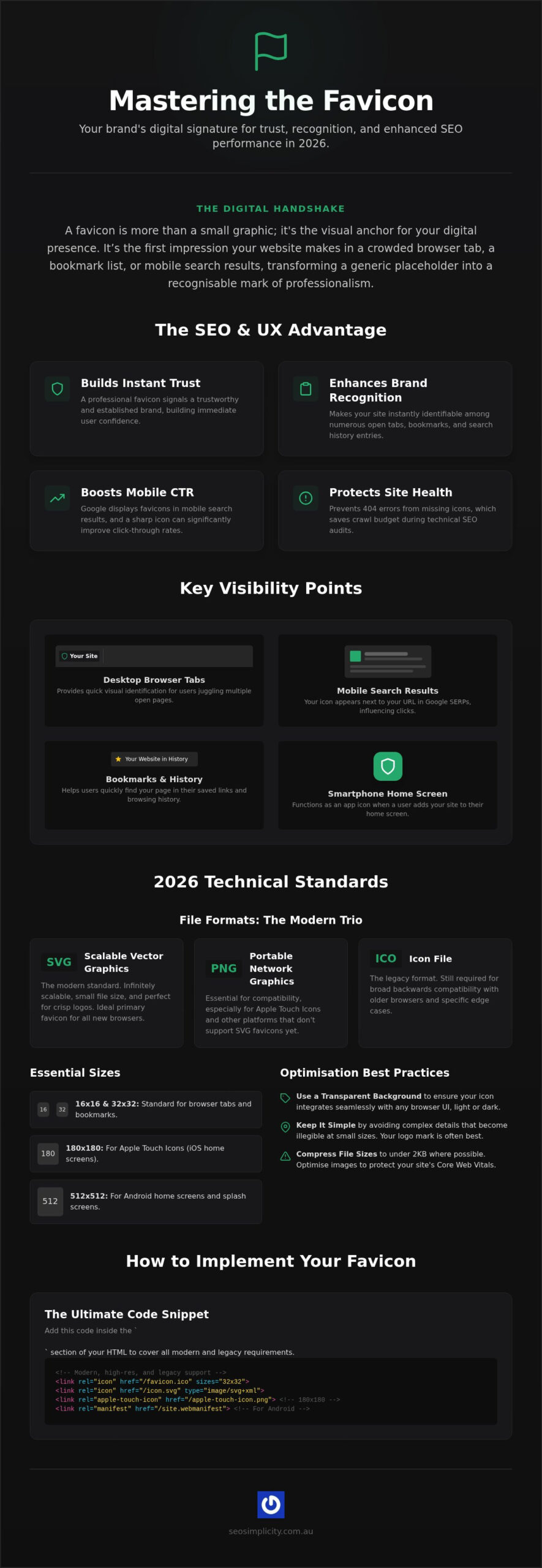
A favicon is much more than a tiny graphic; it’s the digital handshake your website offers before a visitor even reads a single word of your copy. You recognise them instantly as the small icons nestled in your browser tabs, bookmark bars, and mobile search results. While they might seem like a minor aesthetic choice, these icons provide the vital visual cues that help users manage the chaos of dozens of open tabs. Without a clear icon, your site becomes a generic placeholder, easily lost in a sea of competition. In 2026, your favicon acts as the essential visual anchor for your digital presence, ensuring your brand remains recognisable in an increasingly crowded browser environment.
The history of favicons began in 1999 as a simple way for early browsers to track how many people had bookmarked a page. Back then, a site only needed a single “favicon.ico” file in the root directory to function. Today, the role of this asset has transformed from a basic tracking tool into a primary brand identifier that bridges the gap between desktop browsing and mobile app experiences. Implementing a high-quality icon signals to your audience that your business is established, professional, and pays attention to the finer details of the user experience.
Where Do Favicons Appear Today?
Your icon’s visibility extends far beyond the top of a Chrome or Safari window. Modern browsers and operating systems pull this data into multiple high-traffic areas to improve how users interact with the web. Focus on these key areas to maximise your brand’s reach:
- Desktop Browser Tabs: Provides a quick reference point when users have multiple pages open simultaneously.
- Mobile Search Results: Google now displays your icon next to the URL in mobile SERPs, which directly influences your click-through rates.
- Browser History and Bookmarks: Helps users locate your site quickly within a long list of previously visited pages.
- Smartphone Home Screens: Acts as a “web app” icon when a user chooses to “Add to Home Screen” on their iPhone or Android device.
Common Names and Variations
You might hear developers refer to these assets by several different names, depending on the context of the project. While “favicon” is the standard industry term, you’ll also encounter labels like shortcut icons, tab icons, or bookmark icons. These terms often describe the same file, but they highlight the different roles the icon plays across various platforms.
The technical implementation has evolved significantly from the original ICO format. While many legacy systems still rely on the “shortcut icon” relationship attribute in HTML code, modern standards favour high-resolution PNGs and scalable SVG files. This evolution allows your icon to remain crisp on Retina displays and large monitors alike. Using the term “shortcut icon” in your code ensures backwards compatibility with older browsers, while adding modern links caters to the latest devices. Understanding these variations is the first step toward ensuring your site looks professional and trustworthy to every visitor who finds you online.
Technical Standards: Navigating File Formats and Sizes
Mastering the technical specifications of your favicon ensures it remains crisp on every display, from legacy desktops to the latest high-resolution monitors. Adhering to W3C’s favicon standards is the best way to maintain compatibility while embracing modern performance requirements. Standard dimensions for 2026 require a multi-faceted approach. While 16×16 and 32×32 pixels remain the baseline for browser tabs, you’ll need 180×180 pixels for Apple Touch icons and up to 512×512 pixels for Android splash screens. Providing these varied sizes ensures your brand looks professional whether it’s pinned to a taskbar or saved to a smartphone home screen.
Aesthetics and performance must go hand-in-hand to create a seamless user experience. Always prioritise a transparent background to prevent your icon from appearing inside a clunky white box, which can ruin the sleek look of a modern browser UI. Additionally, you’ve got to keep an eye on your file sizes. Use dedicated compression tools to ensure each asset stays under 2KB. While a single icon won’t break your site, a bloated collection of unoptimised images can subtly degrade your page load speed and impact your overall Core Web Vitals, which influences how search engines perceive your site’s health.
The ICO vs. PNG vs. SVG Debate
Choosing between formats doesn’t have to be a compromise; it’s about using the right tool for the job. You should still include a .ico file for legacy browser support, as this container format can bundle multiple sizes into one single file. However, SVG is the clear winner for 2026 due to its infinite scalability and tiny footprint. Because SVGs are code-based, they look perfect at any resolution without increasing your page weight. PNG remains the essential fallback for high-fidelity logos on iOS devices and older Android versions where SVG support might be inconsistent. Using a combination of these formats ensures your site remains accessible and visually striking for all users.
Optimising for Dark Mode
A common oversight for many Australian businesses is failing to test how their icon performs against dark browser themes. If your logo is predominantly black, it’ll effectively disappear when a user switches to dark mode in Chrome or Safari. You can solve this by adding a subtle light-coloured border or a soft outer glow to the graphic, ensuring it stands out against any background. Alternatively, you can leverage the power of SVG by using CSS media queries within the file code to swap colours automatically based on the user’s system settings. This level of detail shows your customers that you’ve built a premium digital experience. If you’re unsure if your site’s assets are currently meeting these standards, a technical SEO audit can help you identify and fix these small but impactful friction points.
The SEO and UX Advantage: Why That Tiny Pixel Matters
While the technical side of implementation is vital, the true value of a favicon lies in its ability to influence human behaviour and search engine results. You’ve likely experienced the frustration of searching through dozens of open browser tabs to find a specific site. Without a distinct icon, your page disappears, forcing the user to click through multiple tabs just to locate your content. By providing a clear visual anchor, you’re not just decorating a tab; you’re actively reducing user friction and ensuring your brand remains top-of-mind throughout their browsing session.
Search engines like Google have recognised this visual importance by integrating these icons directly into their mobile search results. When your site appears in a mobile query, your icon sits prominently next to the URL. This placement transforms a standard text link into a branded experience. Using favicons for brand recognition allows you to capture attention before the user even reads your meta description, which can significantly improve your organic click-through rates (CTR) compared to sites using a generic browser default.
Favicons as a Trust Signal
A professional icon acts as a silent endorsement of your site’s security and legitimacy. When a visitor lands on a page without one, they often subconsciously perceive the site as unfinished, neglected, or even unsecure. This initial hesitation can lead to higher bounce rates and a loss of potential leads. Integrating a custom icon into your site architecture supports your broader off-page SEO strategies by reinforcing a consistent brand identity across the web. It signals to both users and search crawlers that you’re a specialist who values detail and quality, helping you avoid the “spammy” look of a default browser icon.
Mobile Search Visibility
The layout of Google’s mobile SERPs has made the favicon a critical component of your organic search performance. Because mobile screens offer limited real estate, visual elements carry more weight than they do on desktop. A high-contrast, simple design will always win the click over a cluttered logo that becomes unrecognisable at small scales. You want an icon that stands out against various background themes to ensure maximum visibility. This visual clarity builds an immediate connection with the user, making your result feel like the most authoritative choice among a list of competing links. Investing time into this tiny asset pays dividends by turning every search appearance into a branding opportunity.
How to Organise and Implement Your Favicon Strategy
Designing an effective favicon requires a strategic shift in perspective. You cannot simply shrink your full business logo and expect it to remain legible at the standard 16×16 pixel size used in browser tabs. Successful icons focus on a single, high-contrast element, such as a bold initial or a simplified version of your primary graphic. This clarity ensures your brand remains identifiable even at a glance. Once your design is finalised, you must implement it using a structured approach that caters to modern platforms while maintaining a reliable safety net for legacy systems.
Step-by-Step Implementation
Begin by preparing a master image, ideally a 512×512 square PNG. Use a professional generator to transform this file into a comprehensive asset package. This package should include multiple PNG sizes, an SVG for modern browsers, and specific Apple Touch Icons for iOS devices. Upload these files to your server and add the corresponding <link rel=”icon”> tags within your HTML header. As a final precaution, place a standard favicon.ico file in your root directory. This acts as a fallback for older browsers that may not scan your header tags, ensuring your digital signature is always visible.
Common Implementation Mistakes to Avoid
Even a visually stunning icon can fail if the technical execution is flawed. One frequent error is neglecting to update your sitemap or internal file paths when you organise your site assets. If search crawlers encounter broken paths, they won’t display your icon in search results, which directly impacts your brand recognition. Another common pitfall is using unoptimised file sizes. While a few extra kilobytes might seem minor, they contribute to slower load times that can degrade the user experience. Finally, don’t ignore the Apple Touch Icon. Failing to provide this specific asset results in a blurry, distorted graphic on iPhones, which can make your site look unfinished to premium users.
Rigorous testing across different devices and browsers is the only way to confirm your strategy is working. Check your site on mobile and desktop, and verify how the icon appears in various browser themes. If you want to ensure your site’s technical health is helping rather than hindering your growth, book a Technical SEO Audit to resolve any asset implementation issues today.
Integrating Favicons into Your Technical SEO Audit
A missing favicon acts as a red flag during a professional technical SEO audit. It often signals a lack of attention to detail that can correlate with deeper architectural issues. When a browser or search crawler attempts to fetch your site icon and encounters a 404 error, it’s more than a minor aesthetic glitch. These broken requests waste your precious crawl budget, forcing search engines to expend resources on non-existent assets instead of indexing your high-value content. Fixing these errors ensures that every bot interaction with your server is productive and focused on your most important pages.
Future-proofing your asset management is essential, particularly if you’re exploring building an AI SEO tool or app in 2026. These advanced platforms rely on clean, structured data and consistent asset paths to identify and categorise brands accurately. For large enterprise websites, scaling this management requires a centralised approach. Use global templates or CDN-hosted assets to maintain icon consistency across thousands of subdirectories. This prevents the fragmentation that often occurs during large-scale site updates and ensures your brand identity remains intact across every corner of your digital ecosystem.
The Role of Technical Maintenance
Monitor Google Search Console regularly to identify any 404 errors related to your icon files. You’ve got to ensure your robots.txt file doesn’t accidentally block access to these assets, as this prevents search engines from displaying your brand in mobile search results. At SEO Simplicity, we manage these small but vital details through our monthly retainer services. We verify that your icon is fully crawlable and correctly linked, ensuring your technical foundation remains flawless while you focus on scaling your business.
Unlocking Growth Through Detail
Digital success often stems from the cumulative effect of “small wins” in on-page optimisation. Transforming your site from a generic template into a branded authority requires a consistent commitment to these finer points. Correct implementation leads to better brand retention, as users begin to associate your unique icon with reliable, high-quality information. By treating your favicon as a technical asset rather than a decorative one, you solidify your position as a trusted leader in your industry. This methodical approach to detail builds the digital authority necessary to outpace competitors in a crowded market.
Elevate Your Digital Authority through Technical Precision
Mastering your site’s favicon is a foundational step in transforming a generic web presence into a trusted, professional brand. By implementing scalable SVG formats and high-resolution PNGs, you ensure your identity remains sharp across every modern device and browser theme. These small visual markers do more than just look good; they actively protect your technical health by preventing 404 errors that drain your crawl budget. When you focus on these high-impact on-page details, you build a site that search engines reward and users instinctively trust.
We’re here to help you navigate these technical complexities with an expert Australian-based SEO strategy and detailed monthly reporting on your site’s health. You can unlock your site’s full potential with a comprehensive Technical SEO Audit from SEO Simplicity. Let’s work together to refine every detail of your digital presence and drive the growth your business deserves.
Frequently Asked Questions
Do favicons affect my SEO rankings directly?
Google doesn’t use the icon as a direct ranking signal. However, it significantly impacts your click-through rate in mobile search results by building instant brand recognition. Improved click-through rates and reduced bounce rates send positive signals to search engines about your site’s relevance and quality. Think of it as a tool for enhancing visibility and trust rather than a shortcut to the top of the search results.
What is the best file format for a favicon in 2026?
SVG is the superior choice for 2026 because it remains perfectly crisp at any resolution while maintaining a tiny file size. You should still provide a PNG for Apple devices and a legacy .ico file for older browsers. This multi-format approach ensures your favicon looks professional across every possible user environment without slowing down your page load speeds or wasting your crawl budget.
Why is my favicon not showing up in Google search results?
Google may ignore your icon if it’s too small, offensive, or blocked by your robots.txt file. Ensure your icon is a multiple of 48×48 pixels and is easily crawlable by search bots. If you’ve recently updated the file, it might take a few weeks for Google to recrawl and update the display. Consistency is key; avoid changing the URL of your icon file frequently.
How do I make my favicon compatible with dark mode?
Use an SVG file with a built-in CSS media query to automatically adjust colours based on the user’s system settings. If you’re using a PNG, adding a subtle white stroke or a soft outer glow ensures a dark logo remains visible against a black browser background. Testing your design against both light and dark themes is a critical step in any modern technical audit to maintain professional aesthetics.
Can I use an animated GIF as a favicon?
Avoid using animated GIFs as they’re often perceived as distracting or unprofessional by modern users. Most major browsers, including Google Chrome, don’t support animated icons for security and performance reasons. Stick to a static, high-contrast design that reinforces your brand identity without creating unnecessary visual noise. A clean, simple favicon is far more effective at building long-term digital authority and user trust.
What size should my Apple Touch Icon be?
Aim for 180×180 pixels to ensure your icon looks sharp on the latest high-resolution iPhone displays. This specific size covers most iOS devices and prevents the blurry, pixelated appearance that occurs when the system tries to upscale a smaller image. Including this asset is vital for Australian brands looking to capture a premium mobile audience and provide a “finished” look when users save your site to their home screen.
Is it still necessary to have a favicon.ico file in the root folder?
Yes, keeping a favicon.ico file in your root directory remains a best practice for maximum compatibility. While modern browsers look for the link tags in your HTML header, some legacy systems and crawlers still default to checking the root folder first. This simple safety net prevents unnecessary 404 errors and ensures your site looks established even on older hardware or less common browser platforms.
How often should I update my favicon?
Only update your icon during a major brand refresh or if your current design lacks clarity on modern high-resolution screens. Frequent changes can confuse returning visitors who rely on the icon to quickly identify your tab among dozens of others. Focus on creating a timeless, simple graphic that remains recognisable for years, only making adjustments when technical standards or your visual identity evolve significantly.